
LoRA Fine-Tuning:
Train LLMs Efficiently on Your Own Data
LoRA (Low-Rank Adaptation) makes it possible to fine-tune language models with billions of parameters on small GPUs – without retraining the entire model. This guide explains how it works and when you should use it.
What is LoRA?
LoRA stands for Low-Rank Adaptation, a research method introduced by Microsoft in 2021. Instead of updating all the billions of parameters of a large language model during fine-tuning, only small additional matrices are trained.
The principle: a model's weight changes can be mathematically approximated by two small matrices with low rank. These matrices have far fewer parameters than the original model – with equal or even better adaptation quality.
A Llama-3 model with 8 billion parameters needs about 60–80 GB VRAM for full fine-tuning. With LoRA that drops to 6–12 GB – making it feasible on consumer GPUs like the RTX 4070 or 3090.
LoRA vs Full Fine-Tuning – When to Use What?
LoRA Fine-Tuning
- Low VRAM needed (6–16 GB is enough)
- Faster – fewer parameters to update
- Multiple LoRA adapters per base model possible
- Adapters are small and easy to share
- Ideal for domain-specific adaptation
- Well suited for: chatbots, instruction tuning
Full Fine-Tuning
- All model parameters are updated
- More VRAM needed (often 40–80+ GB)
- Better results on very large datasets
- Deeper domain adaptation possible
- No base model dependency
- Well suited for: pre-training, massive domain language
Rule of thumb: For most practical use cases – chatbots, classifiers, domain-specific assistants – LoRA is the better choice. Full fine-tuning only pays off with very large, domain-specific datasets (100,000+ examples) and the corresponding GPU infrastructure.
QLoRA – Even Less VRAM
QLoRA (Quantized LoRA) combines LoRA with 4-bit quantization of the base model. The model is loaded in 4-bit precision, which drastically reduces memory requirements further – while the LoRA adapters are still trained in 16-bit.
Result: Llama-3 8B can be trained with QLoRA on an RTX 3060 (12 GB). A 13B model needs about 14–16 GB VRAM. That makes professional LLM fine-tuning possible even without high-end hardware.
| Model | Full FT | LoRA (FP16) | QLoRA (4-bit) |
|---|---|---|---|
| Llama-3 8B | ~64 GB | ~18 GB | ~10 GB |
| Llama-3 13B | ~104 GB | ~28 GB | ~14 GB |
| Mistral 7B | ~56 GB | ~16 GB | ~8 GB |
| Phi-3 Mini 3.8B | ~30 GB | ~10 GB | ~6 GB |
Key LoRA Hyperparameters
rank (r)typical: 4, 8, 16, 32Rank of the LoRA matrices. Higher rank = more parameters, more capacity, but also more VRAM. r=8 is enough for simple tasks, r=16–32 for more complex domain adaptation.
alpha (α)typical: same as rankScaling factor for the LoRA weights. Often set to the same value as rank. Higher alpha = more aggressive updates.
target_modulestypical: q_proj, v_projWhich layers are adapted with LoRA. Query and value projections are standard. More modules = more capacity, but more memory.
lora_dropouttypical: 0.05 – 0.1Dropout rate on the LoRA layers. Helps against overfitting on small datasets.
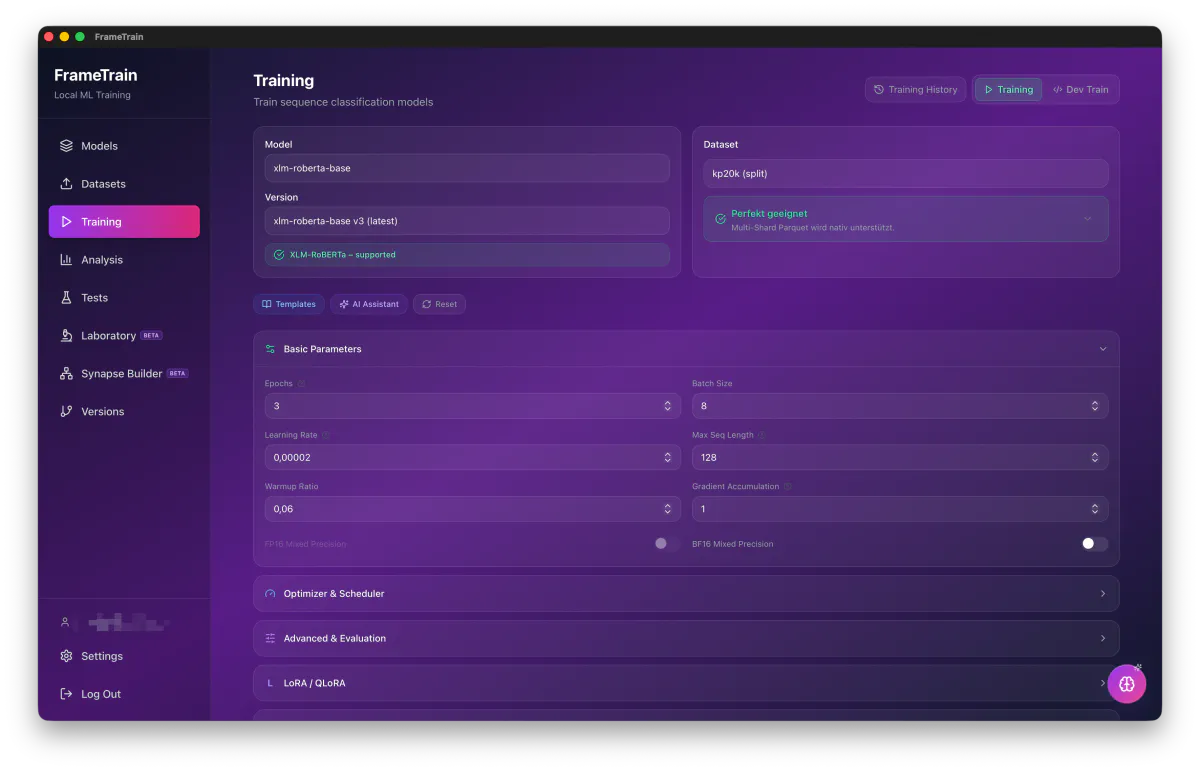
LoRA Fine-Tuning Right Inside FrameTrain
LoRA, QLoRA, rank, alpha, target modules – all configurable through an intuitive interface. No code required. Locally on your GPU.