
Data Quality & Quantity
The most important foundation for any successful training
Garbage in, garbage out – the iron law of ML
How much data do I need?
The amount of data needed depends heavily on the task, the base model, and the desired quality. As rough guidelines (for fine-tuning on pretrained models):
Note: These figures apply to fine-tuning on strong pretrained models. Training from scratch needs 10–100× more data.
Quality > Quantity
For LLMs, quality matters far more than quantity. 100 perfectly curated examples often beat 1,000 poor ones. The InstructGPT paper showed that 13,000 carefully selected RLHF examples were enough to turn GPT-3 into a helpful assistant.
Data quality checklist
No or few duplicates
Exact-match or fuzzy dedup (MinHash). Duplicates make the model weight those examples more heavily.
Correct labels (manual spot checks)
Manually check 5–10% of the dataset. Faulty labels are more common than expected.
Consistent formatting
Uniform encoding (UTF-8), consistent delimiters, consistent label spelling.
No corrupted/extreme entries
Filter: min_length=10 characters, max_length=2048 tokens. Remove HTML tags.
Balanced class distribution
Measure the imbalance ratio. If >5:1: consider balancing (chapter 4 in this section).
Representative content
Test data should match real later usage. No "easier" dataset than in production.
No data leakage
Strict train/val/test separation. No test material in training.
Privacy and licenses checked
No PII (personal data) without anonymization. Check licenses of source data.
Data sources and their quality
Datasets in FrameTrain
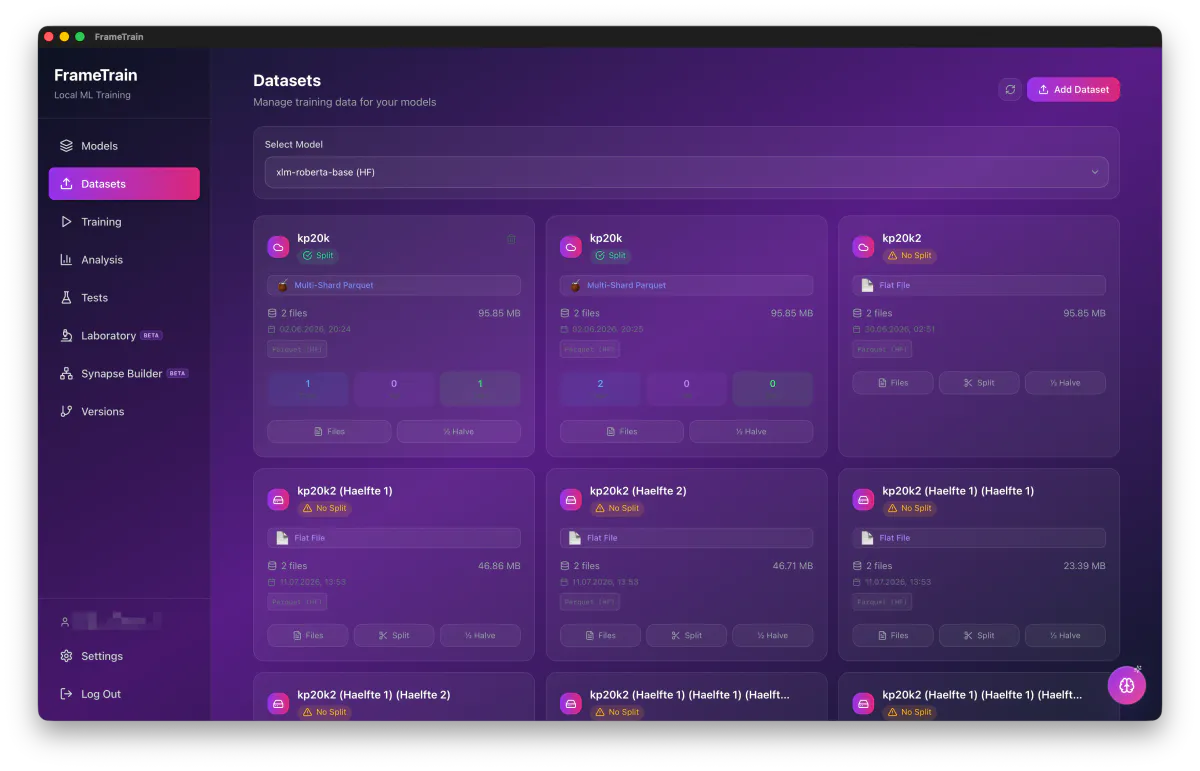
FrameTrain shows format, size, file count and modification date per dataset — and whether a train/val/test split already exists. Multi-shard Parquet is read natively; if a split is missing, you create it right in the app.
Preprocessing
Preparing data optimally for maximum training quality
Good preprocessing can improve model performance by 10–30%. It's the most underestimated phase of the ML pipeline.
Text preprocessing pipeline
# Complete text preprocessing pipeline:

import re
from bs4 import BeautifulSoup

def preprocess_text(text: str) -> str | None:
    # 1. Normalize encoding
    text = text.encode('utf-8', errors='ignore').decode('utf-8')

    # 2. Remove HTML tags
    text = BeautifulSoup(text, 'html.parser').get_text()

    # 3. Remove URLs (optional)
    text = re.sub(r'https?://\S+', '[URL]', text)

    # 4. Normalize whitespace
    text = ' '.join(text.split())

    # 5. Clean special characters (carefully!)
    # Careful: don't be too aggressive – punctuation matters!
    text = re.sub(r'[^\w\s\.,!?;:\'\"()\-–—€$%@#]', '', text)

    # 6. Filter by length
    word_count = len(text.split())
    if word_count < 5:
        return None  # Too short
    if word_count > 512:
        text = ' '.join(text.split()[:512])  # Truncate

    return text.strip()

# Normalize labels
def normalize_label(label: str) -> str:
    return label.strip().lower().replace(' ', '_')
Deduplication – an underrated quality booster
Duplicates in training make the model weight those examples disproportionately. With web scraping, up to 30% of a dataset can be duplicated!
# Exact deduplication:
import hashlib

def deduplicate_exact(dataset: list[dict]) -> list[dict]:
    seen = set()
    unique = []
    for item in dataset:
        h = hashlib.md5(item['text'].encode()).hexdigest()
        if h not in seen:
            seen.add(h)
            unique.append(item)
    return unique

# Fuzzy deduplication (similar texts):
# Use MinHash / LSH for efficient near-duplicate detection
# Library: datasketch
from datasketch import MinHash, MinHashLSH
# → also finds duplicates with small variations
Understanding tokenization
Tokenization converts text into numbers (token IDs). Every model has its own tokenizer – the wrong tokenization means garbage data.
# Tokenizing with the correct tokenizer:
from transformers import AutoTokenizer

# IMPORTANT: always use the base model's tokenizer!
tokenizer = AutoTokenizer.from_pretrained("meta-llama/Llama-2-7b-hf")

# Measure token length BEFORE training:
lengths = [len(tokenizer(text)['input_ids']) for text in texts]
print(f"Median: {sorted(lengths)[len(lengths)//2]} tokens")
print(f"P95:    {sorted(lengths)[int(len(lengths)*0.95)]} tokens")
print(f"Max:    {max(lengths)} tokens")

# Choose max_length based on P95 (not max!)
# → saves memory, only loses 5% of the length
Choosing the sequence length (max_length) correctly
max_length = 64–128max_length = 256–512max_length = 512–1,024max_length = 1,024–2,048max_length = 4,096–8,192VRAM and sequence length
Dataset format for FrameTrain
# Classification (JSON):
{"text": "This product is great!", "label": "positive"}
{"text": "Delivery never arrived.", "label": "negative"}

# Instruction following / chat (JSON):
{"instruction": "Translate to English:",
 'input': "The weather is nice.",
 'output': "The weather is nice."}

# NER (JSON with spans):
{"text": "Apple was founded in Cupertino in 1976.",
 'entities': [{"start": 0, "end": 5, "label": "ORG"},
               {"start": 22, "end": 31, "label": "LOC"}]}
Data Augmentation
Artificially growing and diversifying a dataset
Data augmentation creates new, meaningful training examples from existing ones. Especially valuable when data is scarce or the distribution needs to be diversified.
Text augmentation techniques in detail
Back-translation ⭐
Very highTranslate text into another language, then translate it back. Creates semantically identical, linguistically diverse variants.
# With Helsinki-NLP models:
from transformers import pipeline
en_to_de = pipeline("translation_en_to_de")
de_to_en = pipeline("translation_de_to_en")

def back_translate(text):
    de = en_to_de(text)[0]['translation_text']
    return de_to_en(de)[0]['translation_text']
✓ Advantages:
Semantically correct, natural language variance
✗ Disadvantages:
Slow (2× translation), API costs
LLM-based paraphrasing ⭐
Very highAn LLM generates semantically equivalent variants of a text. Currently the best method for NLP augmentation.
# With a local LLM (Ollama/LM Studio):
prompt = """Create 3 different phrasings
with the exact same meaning:
{original_text}
Output only the 3 variants, one per line."""
✓ Advantages:
Highest quality, very diverse
✗ Disadvantages:
API costs or a local GPU needed
Synonym replacement
MediumReplace words with synonyms (via WordNet, GermaNet for German). Simple, but meaning can shift slightly.
# With NLTK WordNet:
from nltk.corpus import wordnet

def replace_synonyms(text, n_replace=2):
    words = text.split()
    # Replace random words with synonyms
    ...
✓ Advantages:
Very fast, no LLM needed
✗ Disadvantages:
Can change meaning, limited diversity
Random deletion / insertion
Low–MediumRandomly delete, add, or swap words. Makes the model more robust to noise.
def random_deletion(text, p=0.1):
    words = text.split()
    if len(words) == 1: return text
    return ' '.join([w for w in words
                     if random.random() > p])
✓ Advantages:
Very fast, simple to implement
✗ Disadvantages:
Can make texts nonsensical, low quality
Augmentation strategy
Recommended augmentation pipeline:

  1. Clean the original data (preprocessing)
  2. Back-translation for important/rare classes (×2)
  3. LLM paraphrasing for critical examples (×2–3)
  4. Synonym replacement for quick multiplication (×1)

  Result: dataset size ×5–8 at high quality

Important: ALWAYS label augmented data separately
  → e.g. source: "original" vs. source: "augmented"
  → enables quality analysis after training
Using augmentation correctly
Class Balancing
Correctly handling unbalanced datasets
An unbalanced dataset – e.g. 95% negative, 5% positive examples – causes the model to favor the common class. It learns to say "almost always negative": trivial, but useless.
Detecting and measuring imbalance
# Measuring imbalance:
import pandas as pd
df = pd.read_csv('train.csv')
counts = df['label'].value_counts()
print(counts)
# negative   4750
# positive    250
# → ratio 19:1 → strong imbalance!

# Rule of thumb:
# < 3:1    → usually fine, no balancing needed
# 3:1–10:1 → balancing recommended
# > 10:1   → balancing urgently needed

# Imbalance ratio:
ratio = counts.max() / counts.min()
print(f"Imbalance ratio: {ratio:.1f}:1")
Solution strategies in detail
Class weights ⭐ (recommended)
Rare classes are weighted more heavily during training. No data modification needed. The simplest and cleanest method.
# Computing class weights:
from sklearn.utils.class_weight import compute_class_weight
import numpy as np

weights = compute_class_weight(
    'balanced',
    classes=np.unique(labels),
    y=labels
)
class_weights = dict(enumerate(weights))
# {0: 0.53, 1: 10.0}  ← rare class weighted 19× more

# In FrameTrain: enable "Class Weighting"
✓
No data distortion, simple, applied directly in the optimizer
✗
Doesn't work at extreme ratios (> 100:1)
Oversampling (multiplying the minority class)
The rare class is used multiple times during training (with or without augmentation). Simple to implement.
# Random oversampling:
from imblearn.over_sampling import RandomOverSampler

ros = RandomOverSampler(random_state=42)
X_res, y_res = ros.fit_resample(X, y)

# SMOTE (synthetic examples):
from imblearn.over_sampling import SMOTE
smote = SMOTE(random_state=42)
X_res, y_res = smote.fit_resample(X, y)
# SMOTE for text: back-translation is better!
✓
More training data, no information loss
✗
With random oversampling: exact duplicates → mild overfitting
Undersampling (reducing the majority class)
The common class is reduced to the size of the rare class. Simple, but loses information.
# Random undersampling:
from imblearn.under_sampling import RandomUnderSampler

rus = RandomUnderSampler(random_state=42)
X_res, y_res = rus.fit_resample(X, y)

# More controlled: stratified
min_class_size = y.value_counts().min()
balanced = df.groupby('label').sample(
    min_class_size, random_state=42)
✓
Fast, no overfitting from duplicates
✗
Loses data. Problematic on small datasets
Combination: oversample + undersample
Hybrid approach: minority class boosted slightly, majority class reduced slightly. Often the best solution.
# Goal: 3:1 ratio instead of 19:1
n_minority = len(df[df.label=='positive'])  # 250
target_majority = n_minority * 3  # 750

majority_down = df[df.label=='negative'].sample(target_majority)
minority_up = df[df.label=='positive'].sample(
    n_minority * 3, replace=True)  # ×3 oversample

balanced = pd.concat([majority_down, minority_up])
✓
Good balance between information loss and overfitting
✗
Needs more configuration
Metrics for unbalanced data
On unbalanced datasets, accuracy is misleading. Use instead:
FrameTrain recommendation