
Fighting Overfitting
Concrete measures sorted by effectiveness
Overfitting is the most common problem in training. The good news: it's well researched and there are many proven techniques. Used alone or combined, they solve practically every overfitting case.
Overfitting: val loss rises again
The 7 most effective measures against overfitting
More diverse training data
More and more diverse data is always the most effective measure. More examples means the model can't memorize individual ones.
Grow the dataset (real data), data augmentation (chapter 7), generate synthetic data via LLM.
Enable early stopping
Stop training before overfitting begins. Monitor validation loss and stop once it stops dropping.
patience=3–5, monitor="val_loss", always save the best checkpoint.
Use LoRA with a small rank
LoRA drastically limits the number of trainable parameters. Fewer free parameters means less overfitting capacity.
rank=4 or rank=8 instead of rank=32. Only q_proj and v_proj as target_modules.
Increase dropout
A higher dropout value randomly deactivates more neurons. The network has to learn more robust, redundant representations.
Increase LoRA dropout from 0.05 to 0.1–0.2. Watch out: too high → underfitting.
Train for fewer epochs
The simplest solution: just stop earlier. Useful when early stopping reacts too late.
Halve the epochs. The validation loss curve shows where the turning point was.
Increase weight decay (L2 regularization)
Penalizes large weights. Keeps model parameters small and prevents the model from over-weighting individual features.
Increase weight_decay from 0.01 to 0.05–0.1 in the AdamW optimizer.
Enable label smoothing
Instead of hard 0/1 labels, soft labels are used (e.g. 0.9/0.05). Prevents overconfident predictions.
label_smoothing=0.1. Good if the model is too confident.
Combination strategies by situation
Fine-tuning with little data (< 500 examples)
Early stopping + LoRA rank=4–8 + weight_decay=0.1 + dropout=0.1Data limitation is the main problem
Fine-tuning with a medium dataset (500–5,000)
Early stopping + LoRA rank=16 + weight_decay=0.01Standard setup, should work well
Full fine-tuning with little data
Early stopping + small LR (1e-5) + weight_decay=0.1 + dropout=0.2Be careful! Full FT with little data means high overfitting risk
Golden rule for FrameTrain fine-tuning
Diagnosis in FrameTrain
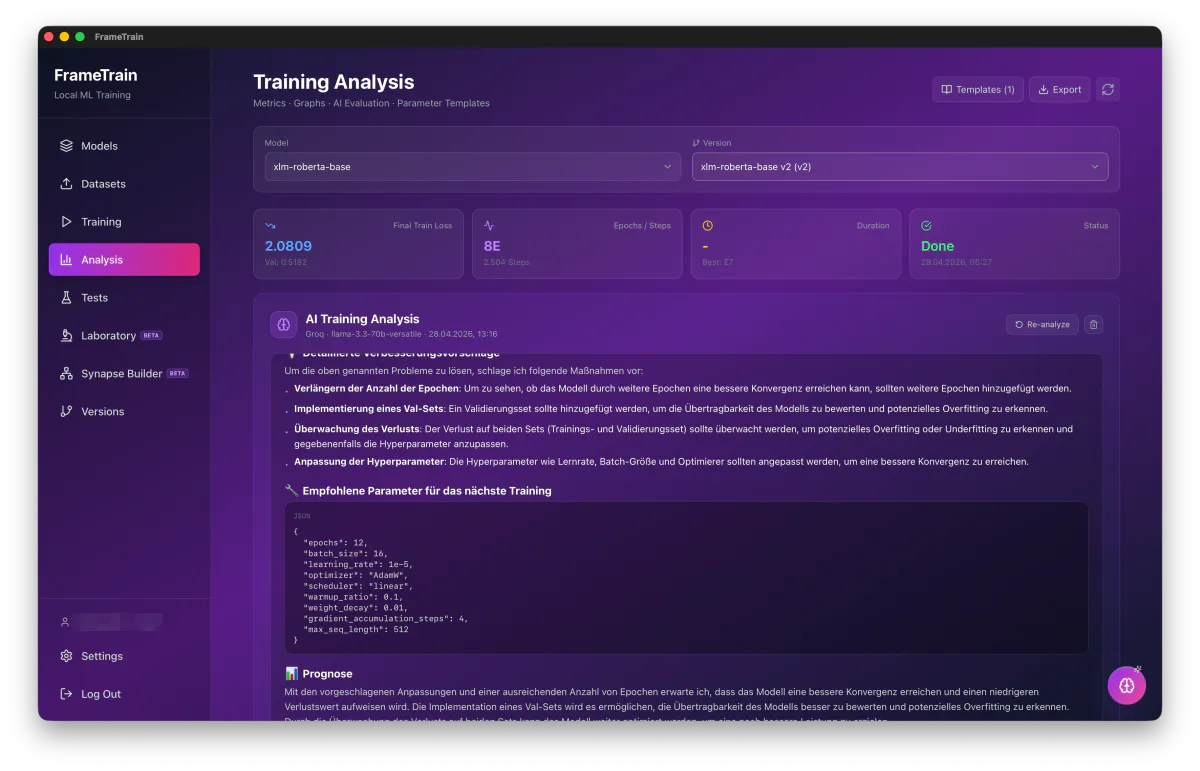
A run's metrics can be handed to a language model of your choice inside FrameTrain. What comes back is not a row of numbers but an assessment in plain language: what went wrong, which measure helps first, and which parameters the next run should start with.
Fixing Underfitting
Step-by-step diagnosis and solutions
Underfitting is often easier to fix than overfitting. The first step is always to identify the exact cause — then the right fix follows.
Systematic diagnosis tree
Does the training loss drop at all in the first 100 steps?
✓ Yes → move on to step 2
✗ NO → immediately: check LR (likely too low), check dataset format (labels correct?)
Is the training loss still dropping at the last epoch without a plateau?
✓ Yes → train for more epochs (stopped too early)
✗ No (plateau but high) → step 3
Can the model overfit a mini-dataset (50 examples)?
✓ Yes (100% train acc) → increase data amount, more epochs, check LR
✗ NO → fundamental problem: LR, model size, or data format is wrong
Is dropout too high or regularization too strong?
✓ Yes → set dropout to 0 to test, reduce weight decay
✗ No → model too small, wrong optimizer, or LR still wrong
Concrete fixes by cause
Learning rate too low
Increase LR step by step: 1e-6 → 1e-5 → 5e-5 → 1e-4. Short training run each time to test.
Too few epochs
Double or triple the epochs. Watch the loss curve: is it still dropping?
Wrong base model
Larger model: 1B → 7B, or a more specialized model for the domain.
Wrong optimizer
AdamW is the standard. SGD without warmup is almost always wrong for transformers.
Errors in the dataset
Manually check samples. Are labels correct? Is tokenization correct? Encoding issues?
Dropout too high
Temporarily set dropout to 0.0. If the model then learns: dropout was too high.
Batch size too small / gradients too noisy
Increase batch size or use gradient accumulation. More stable gradients.
The mini-dataset test – your most important debugging tool
Learning Rate Problems
Fully diagnosing the most common source of errors
The learning rate is the most sensitive of all hyperparameters. Being off by a factor of 10, too high or too low, can mean the difference between perfect training and complete failure.
Learning rate too high: loss jumps around uncontrollably
Learning rate too low: loss barely decreases
LR diagnosis matrix
| Symptom | Diagnosis | Fix |
|---|---|---|
| Loss oscillates heavily, no convergence | LR too high | LR ÷ 5–10 |
| Loss drops <0.001 per epoch | LR too low | LR × 3–5 |
| Loss explodes (NaN/Inf) | LR extremely too high | LR ÷ 100, check clipping |
| Loss drops well, then suddenly spikes | LR too high without warmup | Add warmup |
| Very slow start, then okay | LR starts too low | Shorter warmup or increase LR |
| Plateau after 20% of training | LR too low for fine-tuning | Try a cyclical scheduler |
LR range test – the best method for finding LR
The LR range test is the most systematic method: train for 1 epoch with exponentially increasing LR and plot the loss. The optimal LR sits just before the steepest descent.
LR range test procedure:
  1. Start with a very small LR (e.g. 1e-8)
  2. Increase LR exponentially each step: LR × 1.3
  3. Plot loss vs. LR
  4. Find the point of steepest loss descent
  5. Optimal LR ≈ 1/10 of that point

  Example:
    Steepest descent at LR = 1e-4
    → Good starting LR ≈ 1e-5

  Rule of thumb for transformer fine-tuning:
    BERT family:    2e-5 to 5e-5
    GPT/decoder:    1e-5 to 1e-4
    LoRA (LLaMA):   1e-4 to 3e-4
LR and batch size: the relationship
A larger batch size means more stable gradients, which allows a higher LR. The linear scaling rule:
If batch size × 2 → LR × 2 (linear scaling)

Example:
  Batch size 8, LR = 2e-5 (baseline)
  Batch size 16 → LR ≈ 4e-5
  Batch size 32 → LR ≈ 8e-5

Warning: at very large batch sizes (> 512)
  linear scaling breaks down → square root scaling is better:
  LR ∝ sqrt(batch size)
Warmup: why it matters so much
At the start of training, gradients are unreliable (random initialization). An LR warmup starts with a very small LR and increases it linearly to the target LR:
Without warmup: immediate large update on unreliable gradients
              → instability, possible early divergence

With warmup:
  Steps 1–100:  LR rises from 0 → 2e-5 (linear)
  Steps 101+:   LR at 2e-5 or cosine decay

Recommendation: warmup = 5–10% of total steps
  For 1000 total steps: 50–100 warmup steps
Quick LR recommendations for FrameTrain
2e-5 for BERT-like models, 2e-4 for LoRA. If unstable: halve it. If too slow: double it. Always enable warmup.Loss Spikes & Crashes
Understanding and fixing sudden outliers during training
A loss spike is a sudden, sharp increase in loss during training. Training can recover afterward — or crash completely (gradient explosion).
Spike types and their diagnosis
Single spike, recovers quickly
ModerateCause: Bad batch / outlier in data
Symptoms: Loss jumps 2–10× higher for 1–3 steps, then back to trend
Solutions:
- ✓ Enable/strengthen gradient clipping (max_grad_norm = 0.5)
- ✓ Check the dataset for faulty entries (extremely short/long texts)
- ✓ Increase batch size (averages out outliers)
- ✓ If frequent: a data quality check is strongly recommended
Multiple spikes, no recovery
HighCause: LR too high without sufficient clipping
Symptoms: Recurring large spikes, general instability, no progress
Solutions:
- ✓ Reduce LR by a factor of 5–10
- ✓ Extend the warmup phase
- ✓ Lower gradient clipping to 0.5 or 0.3
- ✓ Increase AdamW epsilon (1e-8 → 1e-6)
Loss explodes to NaN or Inf
CriticalCause: Gradient explosion, numerical instability
Symptoms: Loss becomes NaN, training crashes or errors out
Solutions:
- ✓ Drastically reduce LR (÷100)
- ✓ Lower gradient clipping to 0.5
- ✓ Switch mixed precision to fp32 (disable bf16/fp16)
- ✓ Check layer normalization in the model
- ✓ Check the dataset for extremely rare characters / encoding errors
Loss crash: drops sharply
Mostly positiveCause: Usually POSITIVE: the model learned an important pattern (phase transition)
Symptoms: Loss drops to a new, lower level in a short time and stays there
Solutions:
- ✓ Wait and see! Usually not a problem
- ✓ If it rises again afterward: it was a real spike → normal behavior after clipping
- ✓ If it stays unstable: reduce LR slightly
Preventive measures against spikes
Gradient clipping
max_grad_norm = 1.0 (default)Limits the maximum gradient norm. Protection number 1 against explosions.
LR warmup
warmup_steps = 5–10% totalPrevents early spikes from unreliable gradients at the start.
Data cleaning
filter by max_length, remove duplicatesFaulty or extreme data points are common causes of spikes.
bf16 instead of fp16
torch_dtype=bfloat16BFloat16 has a larger numeric range, less overflow risk than fp16.
FrameTrain protection defaults