
Dokumentation
Alles was du brauchst, um FrameTrain zu installieren, konfigurieren und effektiv zu nutzen.
KI-Training Coach ✨ – ML-Grundlagen, Loss-Kurven, LoRA & mehr
Der komplette Theorie-Guide für alle, die verstehen wollen wie ML-Training wirklich funktioniert
Installation
So richtest du FrameTrain auf deinem System ein
1. Account erstellen & zahlen
Registriere dich auf frame-train.com und wähle einen Plan. Nach der Zahlung erhältst du deinen API-Key per E-Mail.
Account erstellen2. Download
Lade die Desktop-App für dein Betriebssystem herunter:
Windows
Windows 10/11 (64-bit)
macOS
macOS 11+ (nur Apple Silicon M1–M4)
Linux
Ubuntu 20.04+ (AppImage)
3. API-Key eingeben
Beim ersten Start wirst du nach deinem API-Key gefragt. Gib den Key ein, den du per E-Mail erhalten hast. Er wird lokal gespeichert – du musst ihn nur einmal eingeben.
4. Fertig!
FrameTrain ist jetzt einsatzbereit. Weiter mit dem Quick Start.
Installation erfolgreich!
FrameTrain läuft jetzt lokal auf deinem System. Kein Server, keine Cloud, volle Kontrolle.
Systemanforderungen
Minimum
- • CPU: 4 Kerne
- • RAM: 8 GB
- • GPU: NVIDIA GTX 1060 6GB oder Apple M1
- • Speicher: 10 GB frei (50 GB+ empfohlen)
- • Python: 3.8 oder neuer – zwingend erforderlich, wird beim ersten Start geprüft
- • OS: Windows 10/11, macOS 11+ (nur Apple Silicon M1–M4), Ubuntu 20.04
Empfohlen
- • CPU: 8+ Kerne
- • RAM: 16 GB
- • GPU: RTX 3060 12GB+ oder Apple M2 Pro/Max
- • Speicher: 50 GB+ frei (für große Modelle)
- • SSD empfohlen für schnellen Datenzugriff
Quick Start
Dein erstes Modell in 5 Schritten
Modell importieren
Nach dem Login landest du auf der Startseite. Wechsle links in den Model Manager und importiere ein HuggingFace-Modell (z.B. bert-base-uncased) oder lade ein lokales Modell.
Im Suchfeld einfach die HuggingFace Model-ID eingeben und auf Herunterladen klicken.
Datensatz hochladen
Lade deinen Datensatz als CSV oder JSONL-Datei hoch. Minimale Struktur: text + label Spalten.
FrameTrain validiert den Datensatz automatisch und zeigt Vorschau der ersten Zeilen.
Training konfigurieren
Wähle Epochs, Batch-Size und Learning Rate – oder starte mit einem Template.
Für den Einstieg passt das Template „Standard“. Die RAM-Schätzung zeigt direkt, ob der Lauf auf deinen Rechner passt.
Training starten
Klicke auf Training starten. FrameTrain trainiert lokal auf deiner GPU – keine Internetverbindung nötig.
Der Fortschrittsbalken und Live-Charts zeigen Loss und Accuracy in Echtzeit.
Modell testen
Nach dem Training kannst du das Modell direkt in der App testen. Gib Text ein und sieh die Vorhersagen.
Das Modell bleibt lokal gespeichert und kann jederzeit wieder geladen werden.
Herzlichen Glückwunsch!
Du hast dein erstes Modell mit FrameTrain trainiert. Im Versioning-Panel findest du alle gespeicherten Checkpoints.
Erstes Training
Ein komplettes Praxisbeispiel: Sentiment-Klassifikation
1. Datensatz erstellen
Erstelle eine CSV-Datei mit zwei Spalten: text (dein Eingabetext) und label (die Kategorie). Beispiel:
text,label
"Das ist ein positiver Review",positive
"Mir hat das nicht gefallen",negative
"Sehr zufrieden mit dem Produkt!",positive
2. Modell wählen
Für Textklassifikation empfehlen wir:
- •bert-base-uncased – gut für Englisch, schnell
- •deepset/gbert-base – gut für Deutsch
- •distilbert-base-uncased – kleiner & schneller als BERT
3. Parameter einstellen
Empfohlene Startparameter für dieses Beispiel:
4. Training beobachten
Während des Trainings siehst du:
- 📈 Training Loss - sollte stetig sinken
- 📊 Validation Accuracy - sollte gegen 90%+ steigen
- ⚡ GPU-Auslastung - sollte bei 80-100% liegen
- 💾 Restzeit - geschätzte Trainingszeit
Profi-Tipp
Für das erste Training immer mit wenigen Epochs (2-3) und kleinem Datensatz starten. So siehst du schnell, ob die Konfiguration funktioniert.
Startseite
Der Landepunkt nach dem Login – Projektstand statt Modell-Liste
Seit Version 1.2.46 öffnet FrameTrain nach dem Login die Startseite statt der Modellübersicht. Sie beantwortet eine einzige Frage: Was ist passiert, während du weg warst? Über den Home-Button oben links in der Seitenleiste kommst du jederzeit zurück. Jede Karte ist ein Sprung in den zugehörigen Bereich – die Startseite ist bewusst kein zweites Menü.
Läuft gerade
Aktive Trainings mit Fortschritt, aktueller Epoche, Schritt und Loss – ohne ins Training-Panel zu wechseln.
Seit deinem letzten Besuch
Was seit dem letzten Öffnen fertig wurde, gestoppt hat oder fehlgeschlagen ist. Der Zeitstempel friert ein, solange die Seite offen bleibt.
Kennzahlen & letzte Läufe
Modelle, Versionen inklusive Speicherbelegung, Datasets und Trainings, dazu die letzten Trainings und Tests.
Loss-Trend & Bestenliste
Final-Loss der letzten abgeschlossenen Trainings als Sparkline und eine Rangliste der besten Testergebnisse nach Accuracy.
Braucht Aufmerksamkeit
Der Hinweisbereich am Kopf der Seite arbeitet rein regelbasiert – keine KI, keine Tokens, keine Kosten. Er meldet sich nur, wenn es etwas zu melden gibt, und zeigt höchstens fünf Hinweise auf einmal. Ein Klick springt direkt an die Stelle, an der sich das Problem beheben lässt:
- Ein Training läuft, aber der Ruhezustand ist nicht unterdrückt – der Rechner könnte mitten im Nachtlauf einschlafen.
- Der letzte Lauf eines Modells ist fehlgeschlagen oder wurde gestoppt, ohne dass es seitdem einen neuen Versuch gab (pro Modell getrennt).
- Overfitting-Verdacht: Im jüngsten abgeschlossenen Lauf liegt der Validation Loss mehr als 1,5-mal so hoch wie der Training Loss.
- Schwaches Testergebnis: Der jüngste Test kommt auf weniger als 60 % Accuracy.
- Modelle, für die es noch keinen abgeschlossenen Test gibt.
- Datasets, die noch nie in einem Training benutzt wurden.
KI-Briefing
Auf Knopfdruck fasst der eingerichtete KI-Anbieter den Stand in wenigen Sätzen zusammen: kurze Einleitung, Stichpunkte und eine hervorgehobene Handlungsempfehlung. Das Briefing wird zusammen mit einer Prüfsumme der zugrunde liegenden Fakten gespeichert – solange sich nichts Wesentliches ändert, wird der gespeicherte Text angezeigt, statt erneut Tokens zu verbrauchen. Ohne eingerichteten KI-Assistenten bleibt die Karte sichtbar, aber inaktiv.
Läuft nie von allein
Das Briefing wird ausschließlich per Klick erzeugt. Beim Öffnen der Startseite entstehen keine KI-Kosten – alle anderen Auswertungen laufen lokal aus deinen eigenen Trainingsdaten.
Model Manager
Alle deine Modelle an einem Ort
Funktionen
HuggingFace Import
Importiere jedes Modell direkt vom HuggingFace Hub über Model-ID
Lokale Modelle
Lade Modelle von lokalem Pfad (SafeTensors, GGUF, PyTorch)
Modell-Übersicht
Alle importierten Modelle mit Größe, Format und Herkunft
Versionen
Jedes Modell kann mehrere trainierte Versionen haben
Modell importieren
So importierst du ein Modell von HuggingFace:
- 1.Öffne den Model Manager Tab
- 2.Klicke auf "Neues Modell" oder "HuggingFace Import"
- 3.Gib die Model-ID ein (z.B. meta-llama/Llama-3-8B)
- 4.Klicke auf Herunterladen – FrameTrain lädt automatisch alle nötigen Dateien
Empfohlene Startermodelle
bert-base-uncased
110MKlassiker für Text-Klassifikation auf Englisch. Schnell und gut erprobt.
Klassifikationdistilbert-base-uncased
66MLeichtere Version von BERT – gleich gut, aber doppelt so schnell.
Klassifikationmicrosoft/phi-3-mini-4k-instruct
3.8BKleines LLM ideal für LoRA Fine-Tuning auf Consumer-GPUs.
LLM Fine-Tuningmistralai/Mistral-7B-v0.1
7BStarkes Basismodell. Benötigt QLoRA auf GPUs unter 24 GB VRAM.
LLM Fine-TuningTraining Panel
Das Herzstück von FrameTrain
Training-Workflow
Modell & Dataset wählen
Wähle ein importiertes Modell und deinen hochgeladenen Datensatz aus den Dropdown-Menüs.
Hyperparameter konfigurieren
Stelle Epochs, Batch-Size, Learning Rate und weitere Parameter ein. Templates liefern Startwerte, die RAM-Schätzung zeigt, ob der Lauf auf deinen Rechner passt.
Training starten
Klicke auf Training starten. FrameTrain trainiert vollständig lokal – keine Cloud, keine Warteschlange.
Fortschritt überwachen
Live-Charts zeigen Loss, Accuracy und GPU-Auslastung in Echtzeit. Automatische Checkpoints.
Ergebnis speichern
Nach dem Training wird das Modell automatisch versioniert und lokal gespeichert.
Training-Steuerung
- Training starten: Startet das Training mit den aktuellen Einstellungen. Alle Parameter werden vor dem Start validiert.
- Training stoppen: Das Training kann jederzeit gestoppt werden. Der letzte Checkpoint wird als neue Version gespeichert.
- Ruhezustand verhindern: Solange ein Training läuft, hält FrameTrain den Rechner wach (Anti-Sleep), damit Nachtläufe nicht abbrechen.
Templates
FrameTrain bringt eingebaute Templates für häufige Ausgangslagen mit (Auswahl, alle im Abschnitt „Presets“):
Standard
Für die meisten AufgabenKleines Dataset (<5k)
Mehr EpochenGroßes Dataset (>50k)
Größere BatchLow RAM
FP16 + Grad AccumulationDataset Upload
Unterstützte Formate und Best Practices
Unterstützte Formate
CSV (.csv)
JSONL (.jsonl)
JSON (.json)
HuggingFace Hub
So lädst du deinen Datensatz hoch
- 1.Klicke auf "Dataset" im linken Panel
- 2.Wähle "Datei hochladen" oder "HuggingFace Dataset"
- 3.Wähle deine CSV/JSONL-Datei
- 4.FrameTrain validiert die Datei und zeigt eine Vorschau
- 5.Konfiguriere Text-Spalte und Label-Spalte
Dataset-Vorbereitung
Wichtige Hinweise zur Datenvorbereitung:
- Mindestgröße: Mindestens 100 Beispiele pro Klasse für sinnvolle Ergebnisse.
- Klassen-Balance: Versuche, ungefähr gleich viele Beispiele pro Klasse zu haben.
- Textlänge: Texte können variieren, aber sehr kurze Texte (<5 Wörter) können die Qualität verschlechtern.
- Train/Val-Split: FrameTrain teilt den Datensatz automatisch (80/20). Du kannst den Split manuell anpassen.
Datensatz-Werkstatt
Eigene Datensätze für Bild, Text, Audio und Video bauen – sammeln, beschriften, prüfen, exportieren
Kein fertiger Datensatz? Seit Version 1.3.4 baust du ihn direkt in FrameTrain: Daten sammeln, beschriften, prüfen und ohne Umweg ans Training übergeben – lokal auf deinem Rechner und mit Herkunft je Datei.
Der Ablauf
Die Werkstatt ist kein Einweg-Import, sondern ein Kreislauf: Nach dem Training zeigt das Labor, wo dein Modell danebenliegt – genau diese Samples gehen zurück zum Beschriften.
- 01
Sammeln
Ordner, Mikrofon, Web, KI
- 02
Beschriften
Tastatur, 1 bis 9
- 03
Vorschlagen lassen
Unsicherste zuerst
- 04
Qualität prüfen
Dubletten, Balance
- 05
Exportieren
Aufteilung ohne Lecks
- 06
Trainieren
Passendes Plugin
- 07
Im Labor testen
Richtig oder falsch?
Falsche und unsichere Ergebnisse aus dem Labor gehen als neue Arbeit zurück in die Werkstatt.
Sieben Projektarten
Du wählst, was du trainieren willst – nicht ein Dateiformat. Jede Projektart exportiert genau das Format, das das passende Trainings-Plugin liest.
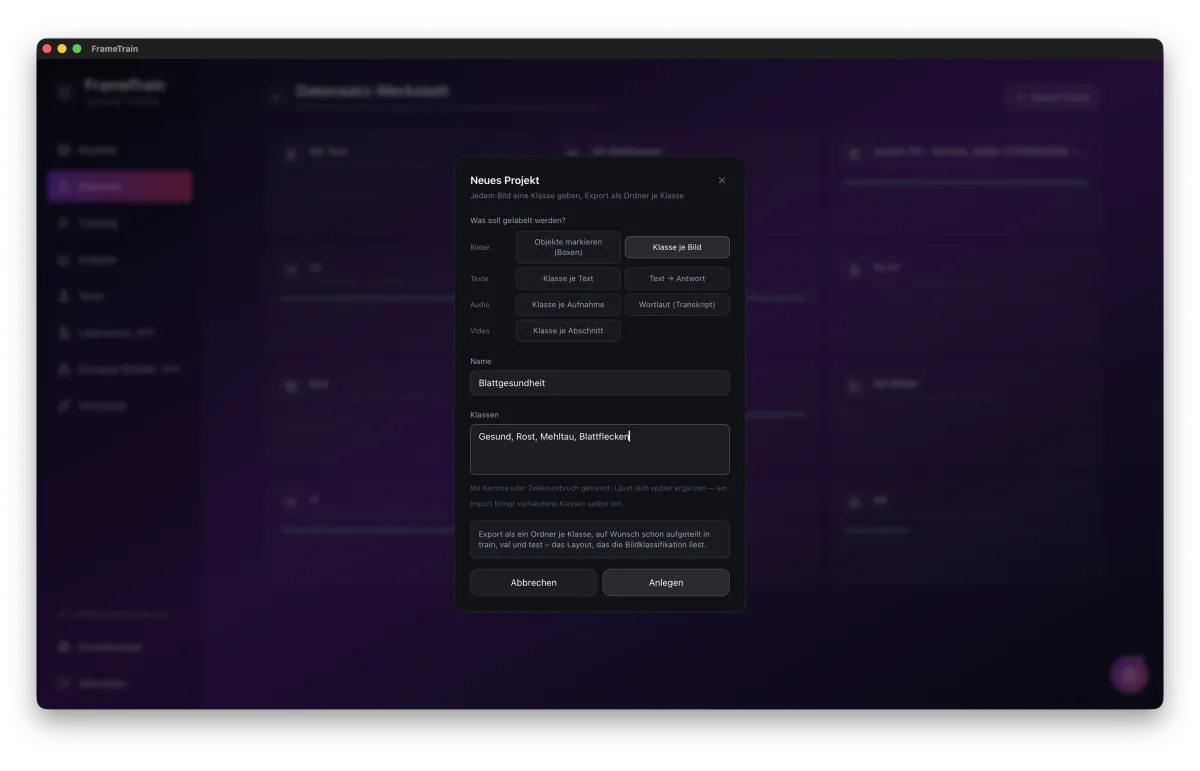
| Projektart | Export | Trainiert mit (Beispiele) | Vorschläge durch |
|---|---|---|---|
| Objekte markieren (Boxen) | YOLO: images/, labels/, classes.txt | YOLOv8, YOLO11 | YOLO-Modell |
| Klasse je Bild | Ein Ordner je Klasse | ViT, ResNet, ConvNeXt, Swin | Bildklassifikator |
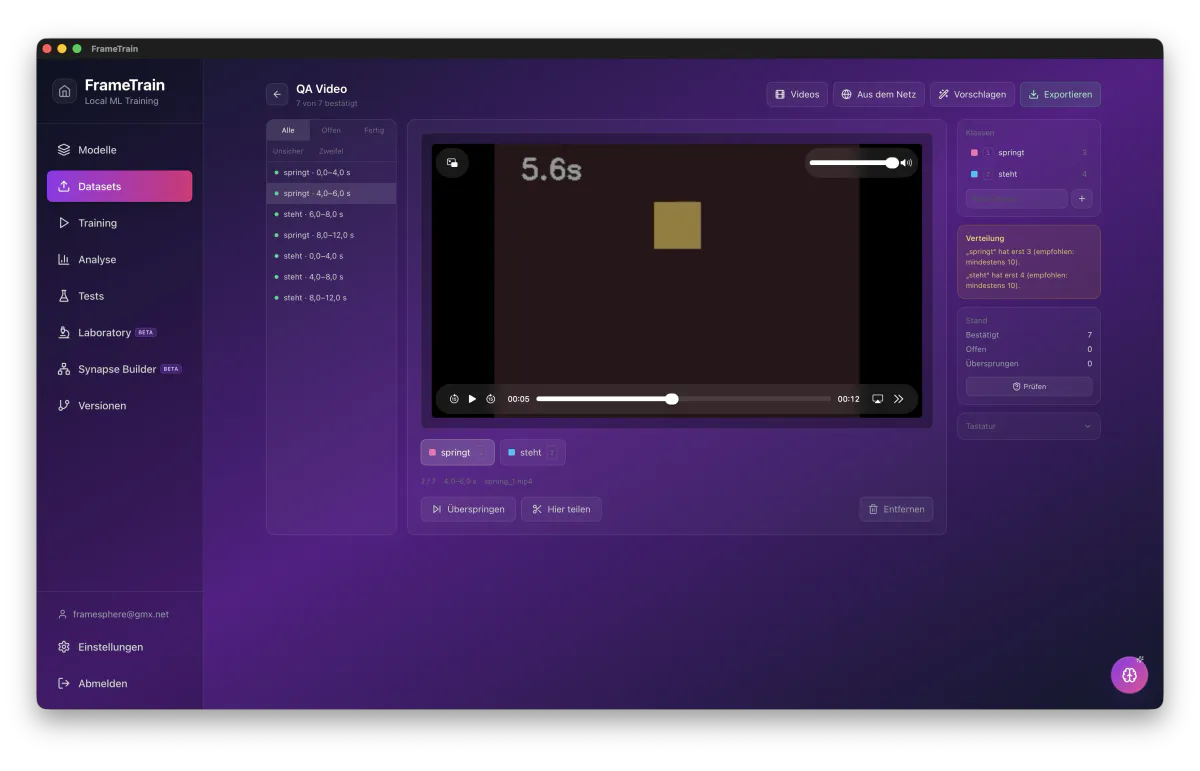
| Klasse je Videoabschnitt | Geschnittene Clips, ein Ordner je Klasse | VideoMAE, TimeSformer, ViViT | Videoklassifikator |
| Klasse je Text | daten.csv mit text und label | BERT, DistilBERT, XLM-RoBERTa, DeBERTa | Textklassifikator |
| Text → Antwort | daten.jsonl mit source und target | T5, mT5, BART | Text-zu-Text-Modell |
| Klasse je Aufnahme | Ein Ordner je Klasse (WAV) | Wav2Vec2, HuBERT, WavLM, AST | Audioklassifikator |
| Wortlaut (Transkript) | Aufnahme mit gleichnamiger .txt | Sprach-zu-Text-Modelle | Whisper, Wav2Vec2-CTC |
Ist noch kein passendes Modell da, nennt die App beim Export eines zum Herunterladen – etwa MCG-NJU/videomae-base für Video oder openai/whisper-small für Transkripte.
Alle Funktionen
Einlesen
Ordner (Unterordner = Klasse), vorhandene FrameTrain-Datensätze, CSV, JSONL, TXT, YOLO-Labels, Einzelbilder aus Videos und Bilder aus der Zwischenablage. Halbfertige Datensätze bearbeitest du weiter, statt neu anzufangen.
Aufnehmen
Mikrofon direkt in der App, gespeichert als 16-kHz-Mono-WAV – Sprach- und Geräuschdaten ohne zweites Programm.
Erstellen
Texte selbst schreiben, einzeln oder als Liste, oder Beispiele je Klasse vom KI-Assistenten erzeugen lassen – mit Vorschau und Korrektur.
Video
Videos in Abschnitte fester Länge zerlegen; ein Abschnitt spielt nur seinen Teil, X teilt ihn an der aktuellen Stelle. Geschnitten wird erst beim Export.
Beschriften
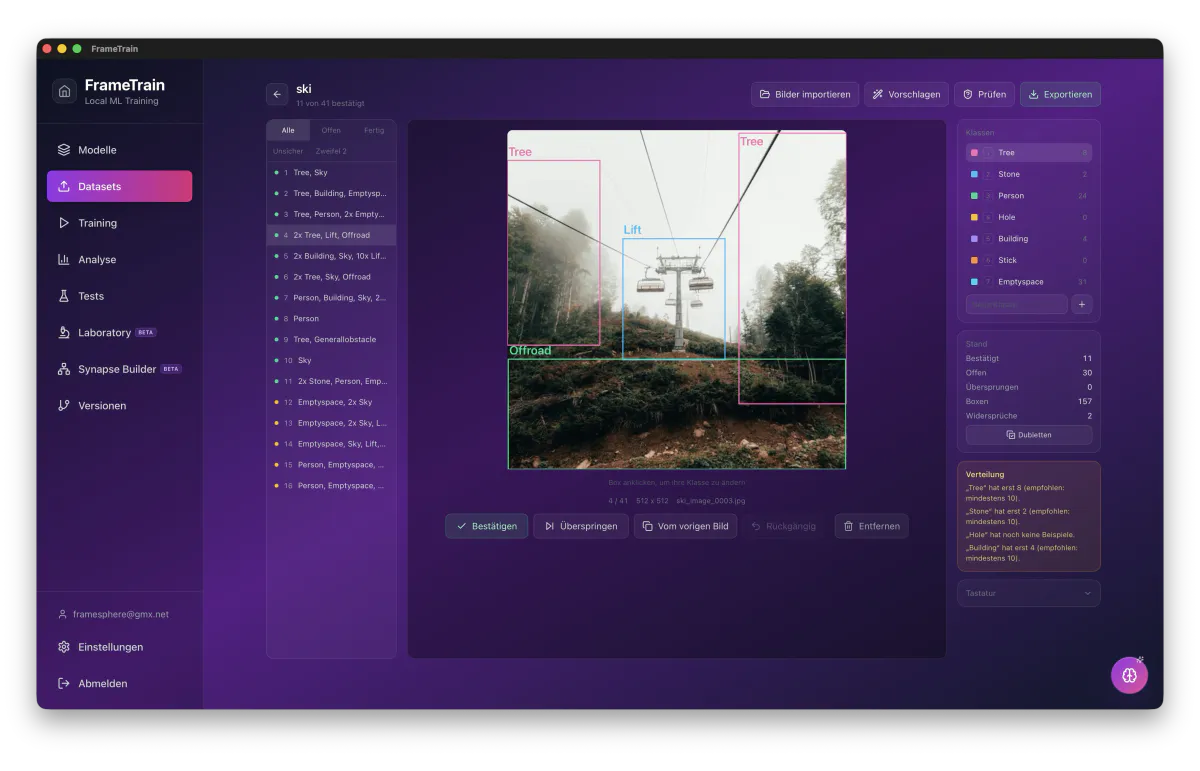
Tastatur für alles (1 bis 9, Enter, S, N, Pfeile) plus Rechtsklick-Menü. Bei Boxen: zeichnen, verschieben, kopieren, duplizieren, zoomen, rückgängig machen.
Modellvorschläge
Ein trainiertes Modell schlägt Boxen, Klassen, Transkripte oder Antworten vor. Nichts gilt als bestätigt, bis du Enter drückst.
Aktives Lernen
Der Filter „Unsicher“ zeigt die Vorschläge mit der geringsten Sicherheit zuerst – deine Zeit fließt dorthin, wo das Modell am meisten lernt.
Prüfen
Das Modell sieht sich bestätigte Samples an; Widersprüche landen im Filter „Zweifel“. So findest du Fehler in übernommenen Labels.
Qualität
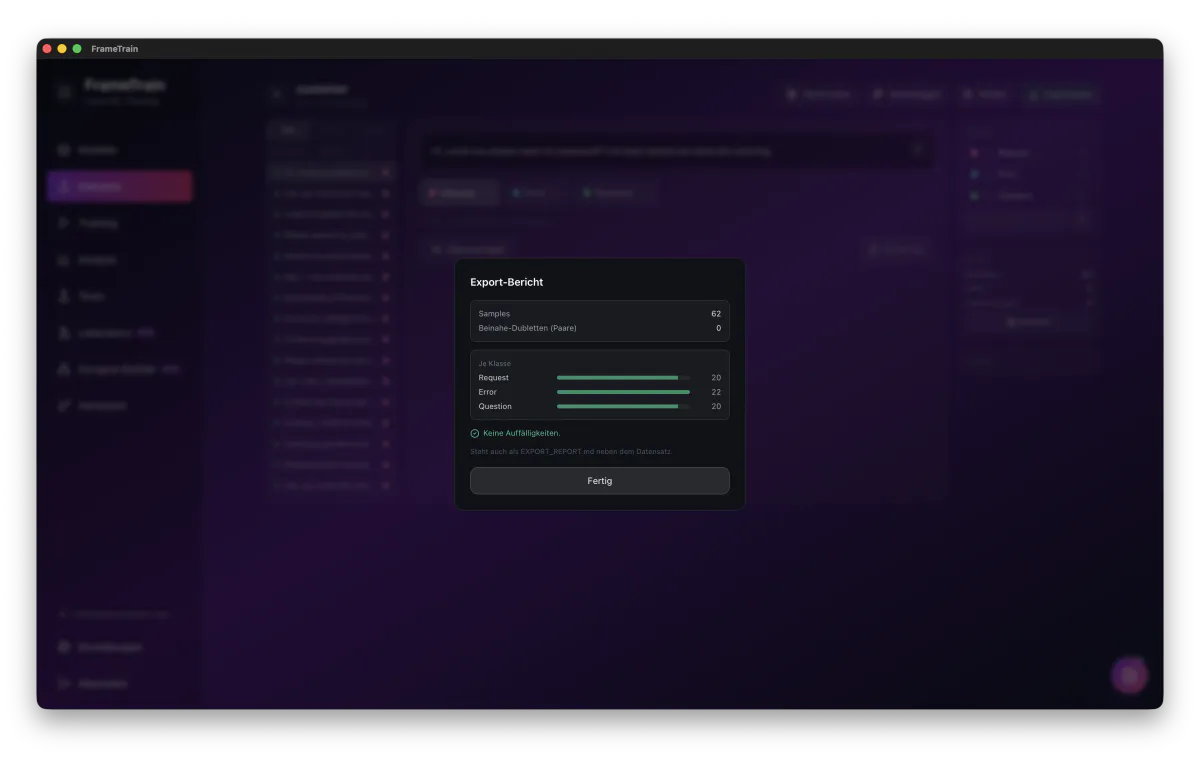
Beinahe-Dubletten bei Texten und Bildern mit Dialog zum Aussortieren, Balance-Warnung je Klasse, Warnung bei nur einer Klasse.
Export
Aufteilung in train, val und test nach Gruppen – Abschnitte eines Videos, einer Seite oder einer Aufnahme bleiben zusammen. Dazu EXPORT_REPORT.md, PROVENANCE.csv und DATA_CARD.md.
Daten aus dem Netz – mit Anstand
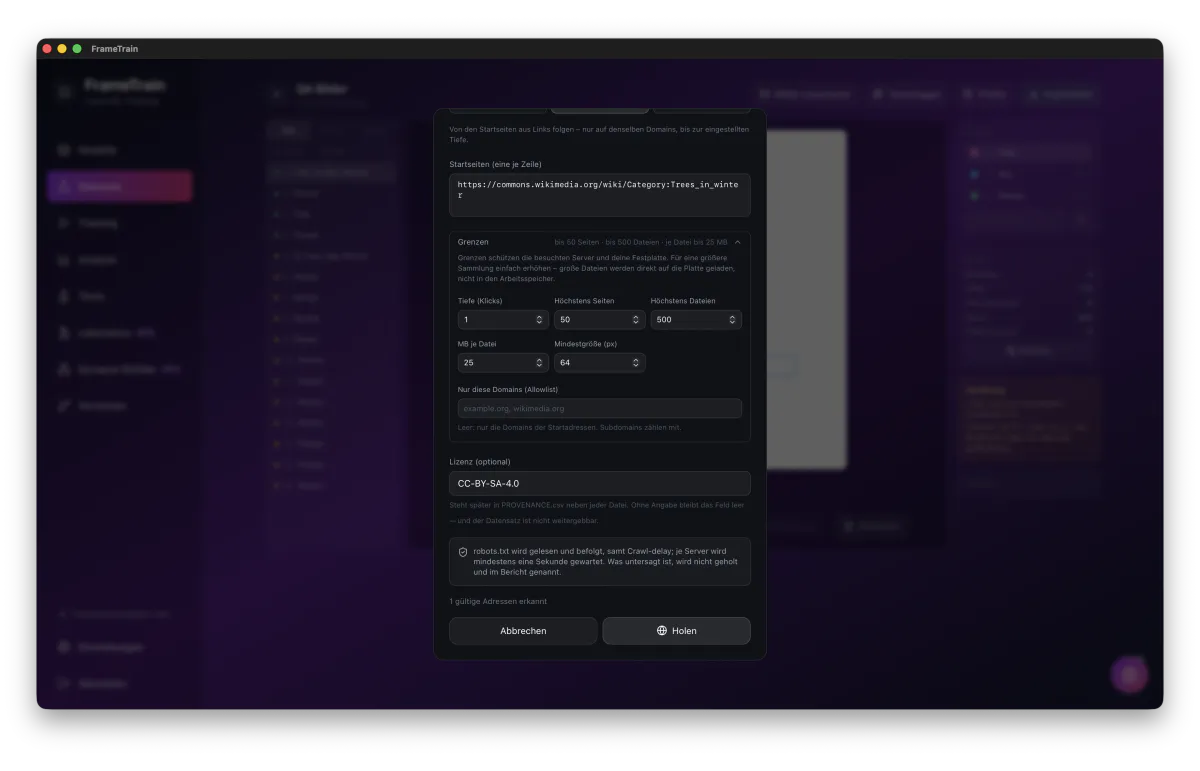
FrameTrain sammelt Bilder, Audio, Video und Textabsätze aus dem Netz wie ein höflicher Besucher: robots.txt wird befolgt, jeder Server bekommt Pausen, und jede Datei behält ihre Herkunft. Es werden Originale geholt, keine Vorschaubilder.
Adressen
Jede Adresse einzeln – etwa eine Galerie, ein Artikel oder eine Liste direkter Dateien.
Website
Von Startseiten aus Links folgen, bis zur gewählten Tiefe und Seitenzahl, nur auf denselben Domains – etwa ein Blog oder eine Doku.
Sitemap
Die Seiten aus der sitemap.xml, auch aus Sitemap-Verzeichnissen und robots.txt – für große Websites gezielt und vollständig.
Die Regeln, die immer gelten
- robots.txt wird gelesen und befolgt, inklusive Crawl-delay; Untersagtes steht im Bericht.
- Mindestens eine Sekunde Abstand je Server.
- Allowlist für Domains; ohne Allowlist bleibt ein Crawl auf den Domains der Startadressen.
- Größenlimit je Datei; große Dateien gehen als Stream direkt auf die Platte.
- Startwerte: Bilder 500 Dateien à 25 MB, Audio 300 à 200 MB, Video 100 à 4 GB, Texte 2000 Absätze.
- Symbole und Zählpixel fallen weg; bei Text fallen Navigation, Kopf- und Fußzeilen weg.
- Jede Datei trägt Adresse, Fundseite und die angegebene Lizenz; Samples einer Seite bleiben beim Aufteilen zusammen.
- Anhalten jederzeit – was bis dahin geholt ist, bleibt.
Ohne Vorwissen startklar
Projekt anlegen, Daten holen, mit Zahlen beschriften, exportieren – das schaffst du ohne Anleitung. Projektarten heißen nach dem Ziel statt nach Formaten, passende Modelle sind vorausgewählt, und die App warnt in Klartext vor zu wenigen Beispielen, unausgewogenen Klassen, leerer Validierung, Kopien über Teilgrenzen und fehlenden Lizenzen. Modellvorschläge bleiben Vorschläge, Entfernen braucht einen zweiten Klick.
Noch nicht enthalten (Stand 1.3.4)
- Kein Segmentieren mit Masken und keine Assistenz durch SAM oder CLIP – Boxen werden gezeichnet oder vom Modell vorgeschlagen.
- Keine Markierung einzelner Wörter in Texten (Named Entities).
- Keine Kamera oder Bildschirmaufnahme als Quelle.
- Seiten, die ihren Inhalt erst per JavaScript nachladen, liefern wenig; Such- und Bildsuche-Schnittstellen sind nicht angebunden.
- Kein COCO-Export und keine Augmentierung beim Export.
- Beinahe-Dubletten nur bei Texten und Bildern; bei Audio und Video werden exakte Kopien erkannt.
Analyse
Trainingsmetriken verstehen und interpretieren
Wichtige Metriken
Training Loss
↓ sinktFehler des Modells auf den Trainingsdaten. Sollte während des Trainings kontinuierlich sinken.
Validation Loss
↓ sinktFehler auf den Validierungsdaten. Zeigt die Generalisierungsfähigkeit. Wenn deutlich höher als Train Loss: Overfitting.
Accuracy
↑ steigtAnteil korrekt klassifizierter Beispiele. Für Klassifikationsaufgaben. Gut ab ~85%.
Gradient Norm
stabil <5Größe der Gradienten. Bei sehr großen Werten (>10) kann Gradient Clipping helfen.
Häufige Probleme
Overfitting
Train Loss sinkt, Validation Loss steigt. Modell lernt Trainingsdaten auswendig statt zu generalisieren.
Lösung: mehr Daten, mehr Dropout (0.1-0.3), weniger Epochs oder Datensatz vergrößern.
Underfitting
Beide Losses sinken langsam oder nicht. Modell lernt nicht genügend.
Lösung: mehr Epochs, höhere Learning Rate, mehr LoRA-Rank oder anderes Modell wählen.
Testing & Inferenz
Trainierte Modelle direkt in der App testen
Funktionen
- Direkte Eingabe: Gib beliebigen Text ein und sieh die Modell-Vorhersage sofort.
- Confidence Scores: Zeigt die Wahrscheinlichkeit für jede Klasse an.
- Batch-Testing: Teste mehrere Texte auf einmal aus einer Datei.
- Versionsvergleich: Vergleiche Vorhersagen verschiedener Modellversionen.
Beispiel
Eingabe:
"Dieses Produkt ist fantastisch! Ich bin sehr zufrieden."
Ausgabe:
Versioning
Automatische Versionierung aller Trainingsartefakte
Was wird versioniert?
FrameTrain speichert nach jedem Training automatisch: Modell-Gewichte, Trainingsparameter, Metriken, Datensatz-Referenz und Timestamp.
Versioning-Workflow
Nach einem erfolgreichen Training wird automatisch ein Checkpoint erstellt.
Gib deiner Version einen sprechenden Namen (z.B. "v1.0-sentiment-de").
Wähle zwei Versionen und vergleiche ihre Metriken nebeneinander.
Exportiere jede Version in deinen Downloads-Ordner – als Kopie aller Dateien, die das Training erzeugt hat.
Trainingshistorie
Im Historien-Panel siehst du alle vergangenen Trainings mit:
- •Datum & Uhrzeit
- •Verwendetes Modell & Datensatz
- •Finale Loss und Accuracy
- •Verwendete Hyperparameter
- •Dauer des Trainings
KI-Assistent & Coach
Coach mit Skills, Token-Budget, Anbieter und API-Keys – optionale KI-Hilfe in jedem Bereich
Die KI-Funktionen sind optional und ab Werk ausgeschaltet. Du aktivierst sie unter Einstellungen → KI-Assistent und legst dort Anbieter, Modell und Token-Budget fest. Diese Einstellungen gelten für alle KI-Funktionen der App. Das Training selbst hängt nicht davon ab und läuft immer lokal.
Anbieter und API-Keys
Zur Wahl stehen Claude (Anthropic), OpenAI, Groq und Ollama. Für Claude, OpenAI und Groq brauchst du einen eigenen API-Key des Anbieters. Ollama läuft ohne Key komplett auf deinem Rechner.
- Ein Key pro Anbieter: Claude, OpenAI und Groq behalten jeweils ihren eigenen Key. Ein Wechsel des Anbieters verliert keinen Key mehr, die Anbieter-Kacheln zeigen „Key hinterlegt“. Keys aus älteren Versionen werden automatisch übernommen.
- Sicher gespeichert: Keys liegen im Schlüsselbund des Betriebssystems (macOS Keychain, Windows Credential Manager), nicht im Klartext, und werden nie an FrameTrain übertragen.
- Nichts geht versehentlich verloren: Änderungen greifen erst nach „Speichern“. Speichern mit leerem Key-Feld löscht keinen hinterlegten Key. „Verbindung testen“ prüft Key und Modell.
- Eigene Modell-ID: Hat ein Anbieter ein Modell abgekündigt, trägst du die neue ID selbst ein. Reasoning-Modelle von OpenAI (o-Serie, GPT-5) werden unterstützt.
- Ollama: Das Kontextfenster wächst mit dem Prompt, statt still abzuschneiden. Fehlt das gewählte Modell lokal, erklärt die App, was zu tun ist. Interne <think>-Blöcke erscheinen nicht im Chat.
Token-Budget
Das Token-Budget steuert für alle KI-Funktionen gleichzeitig, wie lang Antworten werden, wie gründlich das Modell nachdenkt, wie viel Kontext mitgeschickt wird und wie viel Chat-Verlauf erhalten bleibt. Bei Claude skaliert der Denk-Aufwand mit dem Budget. Jede Stufe funktioniert vollständig: Minimal heißt kurz, nicht kaputt – keine leeren Berichte, leeren Chat-Blasen oder abgebrochenen Antworten.
Maximum und Unlimited brauchen Zeit
Bei diesen Stufen zeigt die Ladeanzeige an, dass eine Antwort bis zu einer Minute dauern kann. Klar umrissene Aufgaben wie Code-Korrekturen oder Chat-Titel deckeln den Denk-Aufwand trotzdem, damit sie schnell bleiben. Wird eine Antwort am Limit abgeschnitten, kennzeichnet die App das.
KI-Coach
Der Coach ist ein Chatfenster, das du auf jeder Seite öffnen kannst. Er kennt bei jeder Nachricht den aktuellen Zustand der Seite, etwa deine Trainings-Konfiguration, die Analyse-Kennzahlen (Loss-Reduktion, Overfitting-Gap, Gradient-Norm, Dauer, Status) oder den Stand auf der Startseite, und antwortet darauf bezogen statt allgemein. Hinweise nennt er im Wortlaut der Seite, und jeder Chat bleibt mit seinem Verlauf erhalten.
Übernehmen-Buttons
Konkrete Vorschläge erscheinen als Buttons direkt unter der Antwort – nur dort, wo sie auf der aktuellen Seite etwas bewirken, und nie für Einstellungen, die der Modelltyp ignoriert.
RAM-Schätzung
Coach und Training-Panel rechnen mit derselben Formel und vergleichen mit dem Arbeitsspeicher deines Rechners: „passt“, „knapp“ oder „reicht nicht“. Bei Bildmodellen zählt die Bildgröße (imgsz).
Kennt dein Modell
Der Coach kennt die Parameter des zuständigen Plugins, etwa imgsz oder den Optimizer bei YOLO, und empfiehlt nichts, was der Modelltyp nicht unterstützt.
Training starten und stoppen
Mit eingeschalteter Automation darf der Coach ein Training starten oder stoppen – jeweils erst nach deiner Bestätigung.
Skills: vorbereitete Fragen per /
Tippst du im Eingabefeld des Coaches ein /, öffnet sich eine Liste mit vorbereiteten Fragen, die zur aktuellen Seite passen. Du wählst per Pfeiltasten und Enter, mit Tab oder per Klick. Skills kosten keine zusätzlichen Tokens – sie stellen die Frage nur präziser als „hilf mir mal“.
| Seite | Skills |
|---|---|
| Überall | /hier, /weiter |
| Startseite | /stand |
| Modelle | /modellwahl |
| Training | /config, /ram, /oom, /schneller |
| Dev Train & Dev Test | /review, /fehler |
| Datasets | /daten |
| Analyse | /bewerten, /naechsterlauf, /kurven |
| Tests | /ergebnis |
| Versionen | /version |
| Einstellungen | /budget, /anbieter |
| Laboratory | /experiment |
| Synapse Builder | /graph |
KI in den einzelnen Bereichen
- Code-Assistent (Dev Train, Dev Test): Schlägt Änderungen an deinem Skript als Diff vor. Übernommener Code enthält keine Markdown- oder Protokoll-Reste. Passt ein Vorschlag nicht zum Skript, wird er rot als „nicht anwendbar“ markiert und das Skript bleibt unverändert. Pfade schreibt er nach App-Konvention über os.environ.get(...).
- Metrik-Assistent (Training): Empfiehlt Trainingsparameter inklusive Plugin-Parametern, zum Beispiel bei YOLO, und zeigt nur echte Änderungen gegenüber deiner aktuellen Konfiguration.
- Trainingsanalyse: Erstellt einen Bericht zu einer Modellversion. Die Tiefe skaliert mit dem Budget, lange Trainings gehen als Stichprobe ein. Rückfragen im Analyse-Chat werden direkt beantwortet, statt jedes Mal einen neuen Gesamtbericht zu schreiben.
- Synapse Magic: Baut oder ändert Graphen im Synapse Builder und meldet danach „Fertig – N Änderungen am Canvas“.
- Laboratory und Startseite: Der Labor-Assistent hilft beim Experimentieren mit einzelnen Samples, das KI-Briefing fasst den Projektstand auf Knopfdruck zusammen.
Was an den Anbieter geht
Mit Claude, OpenAI oder Groq wird der Kontext deiner Anfrage an diesen Anbieter geschickt, zum Beispiel Konfiguration, Kennzahlen oder Skript-Code. Mit Ollama bleibt alles auf deinem Rechner. Solange der KI-Assistent ausgeschaltet ist, geht nichts davon aus der App.
Training-Grundlagen
Die wichtigsten Konzepte des ML-Trainings
Fine-Tuning vs. From Scratch
Fine-Tuning (empfohlen)
- • Startet mit vortrainiertem Modell
- • Braucht weniger Daten (100-10.000)
- • Viel schneller (Minuten statt Wochen)
- • Bessere Ergebnisse bei kleinen Datensätzen
Training from Scratch
- • Modell von null trainieren
- • Braucht riesige Datenmengen (Millionen)
- • Sehr zeitaufwändig (Wochen bis Monate)
- • Benötigt massiv GPU-Ressourcen
Epochs & Batches
Epoch: Ein vollständiger Durchlauf durch den gesamten Datensatz. Batch: Eine Teilmenge des Datensatzes, die gleichzeitig verarbeitet wird. Steps: Anzahl der Parameteraktualisierungen = Datensatzgröße / Batch-Size.
Beispiel: 1000 Datenpunkte, Batch-Size 32:
1 Epoch = 1000 / 32 = ~31 Batches ✓
Loss & Accuracy
Training Loss
Misst den Fehler des Modells. Niedrigerer Loss = bessere Vorhersagen. Wird bei jeder Parameteraktualisierung berechnet.
Accuracy
Misst den Anteil korrekter Vorhersagen. Für Klassifikation: % der korrekt klassifizierten Beispiele. Ziel: so hoch wie möglich.
Hyperparameter
Wichtige Parameter und ihre Auswirkungen
Wichtige Hyperparameter
Learning Rate
Standard: 2e-4Wie groß die Parameteranpassungen sind. Zu hoch: Training divergiert. Zu niedrig: Training zu langsam.
Bereich: 1e-6 bis 1e-3
💡 Starte mit 2e-4 für LoRA, 2e-5 für Full Fine-Tuning
Batch Size
Standard: 4Wie viele Beispiele gleichzeitig verarbeitet werden. Größere Batches = stabilere Updates, aber mehr VRAM.
Bereich: 1 bis 64
💡 Bei VRAM-Problemen Batch-Size halbieren
Epochs
Standard: 3Wie oft der gesamte Datensatz durchlaufen wird. Mehr Epochs können zu Overfitting führen.
Bereich: 1 bis 20
💡 3-5 Epochs für die meisten Tasks optimal
LoRA Rank (r)
Standard: 16Größe der LoRA-Matrizen. Höherer Rank = mehr Kapazität, aber mehr VRAM und Trainingszeit.
Bereich: 4 bis 64
💡 r=16 ist ein guter Standard. Für wenig VRAM: r=8
Max Seq Length
Standard: 2048Maximale Tokenanzahl pro Eingabe. Längere Sequenzen = mehr VRAM.
Bereich: 128 bis 4096
💡 An die durchschnittliche Textlänge deiner Daten anpassen
LoRA Training
Parameter-effizientes Fine-Tuning
Was ist LoRA?
LoRA (Low-Rank Adaptation) ist eine Methode, Sprachmodelle mit einem Bruchteil des VRAM eines vollständigen Fine-Tunings anzupassen. Statt alle Modellparameter zu aktualisieren, fügt LoRA kleine "Adapter"-Matrizen ein.
Diese Adapter werden trainiert, während das Originalkörpermodell eingefroren bleibt. Ergebnis: 70-90% weniger VRAM bei vergleichbarer Qualität.
LoRA vs. Full Fine-Tuning
Full Fine-Tuning
- • Alle Parameter werden trainiert
- • 60-80 GB VRAM für 7B Modell
- • Sehr langsam
- • Ünderungen dauerhaft im Modell
LoRA Fine-Tuning
- • Nur Adapter-Matrizen werden trainiert
- • 8-18 GB VRAM für 7B Modell
- • Viel schneller
- • Adapter sind separate Dateien
LoRA Konfiguration
LoRA Rank (r)
Größe der niedrig-rangigen Matrizen. Höherer Rank = mehr Kapazität. Standard: 16
LoRA Alpha
Skalierungsfaktor für die LoRA-Gewichte. Meist auf den Rank-Wert gesetzt. Standard: 32
LoRA Dropout
Dropout-Rate für LoRA-Schichten. Hilft gegen Overfitting bei kleinen Datensätzen. Standard: 0.05
Target Modules
Welche Schichten adaptiert werden. Standard: q_proj, v_proj. Mehr Module = mehr Kapazität
QLoRA aktivieren
Für 4-Bit-Quantisierung (QLoRA) aktiviere "4-bit Loading" im Training Panel. Reduziert VRAM-Bedarf um ~50%.
Dataset-Formate
Alle unterstützten Formate im Detail
CSV-Format
Einfachstes Format. Erste Zeile = Header. Pflichtfelder: text, label.
text,label
"Dies ist positiv",positive
"Das gefällt mir nicht",negative
"Sehr gut!",positive
"Schrecklich",negative
JSONL-Format
Ein JSON-Objekt pro Zeile. Flexibler als CSV für komplexe Strukturen.
{
  "text": "Dies ist positiv",
  "label": "positive",
  "source": "review"
}
{
  "text": "Das gefällt mir nicht",
  "label": "negative",
  "source": "comment"
}
Best Practices
- Datenmenge: Mindestens 100, idealerweise 500+ Beispiele pro Klasse.
- Klassen-Balance: Ähnliche Anzahl Beispiele pro Klasse für ausgewogenes Training.
- Datensätze splitten: 80% Training, 20% Validation. FrameTrain macht dies automatisch.
- Text bereinigen: Entferne HTML-Tags, sonderzeichen, doppelte Leerzeichen.
- Labels konsistent: Schreibweise der Labels muss konsistent sein ("positive" != "Positive").
Monitoring
Training-Fortschritt in Echtzeit verfolgen
Live-Monitoring Panel
Während des Trainings zeigt FrameTrain folgende Echtzeit-Informationen:
- GPU-Auslastung: VRAM-Verbrauch und GPU-Temperatur in Echtzeit
- Loss-Kurven: Training Loss und Validation Loss als interaktive Linien-Charts
- Accuracy-Chart: Accuracy-Verlauf und Gradient Norm
- Zeitschätzung: Vergangene Zeit und geschätzte Restzeit
Automatische Checkpoints
FrameTrain speichert automatisch Checkpoints:
- Am Ende jeder Epoch
- Bei Verbesserung des Validation Loss (Best Model Saving)
- Bei manuellen Stops
- Als vollständige Modell-Snapshots
Optimierung
Training schneller und speichereffizienter machen
Batch-Size Optimierung
Die Batch-Size ist der wichtigste Faktor für VRAM-Verbrauch und Trainingsgeschwindigkeit:
LoRA vs. Full Fine-Tuning
Für die meisten Anwendungsfälle ist LoRA die bessere Wahl:
Standard Fine-Tuning:
Alle Parameter aktualisieren, viel VRAM, langsam.
LoRA Fine-Tuning:
Nur Adapter-Matrizen trainieren, wenig VRAM, schnell, vergleichbare Ergebnisse.
Gradient Checkpointing
Aktiviere Gradient Checkpointing in den Trainingseinstellungen um ~30-40% VRAM zu sparen. Das Training wird etwas langsamer, aber du kannst größere Modelle trainieren.
Beispiel: 7B Modell mit LoRA: 18 GB VRAM → mit Gradient Checkpointing: 12 GB VRAM
GPU Setup
NVIDIA CUDA und Apple Silicon konfigurieren
NVIDIA CUDA Setup
FrameTrain erkennt NVIDIA-GPUs automatisch. Voraussetzungen:
NVIDIA-Treiber installieren
Aktuellen Treiber von nvidia.com/drivers herunterladen und installieren (Version 525+).
CUDA automatisch
CUDA wird automatisch mit FrameTrain installiert – keine separate Installation notwendig.
GPU verifizieren
In der App: Einstellungen → System → Hardware & Beschleunigung. Dort siehst du, ob CUDA verfügbar ist.
Apple Silicon (M1-M4)
Apple Silicon wird vollständig unterstützt – keine zusätzliche Konfiguration nötig. FrameTrain nutzt automatisch Metal Performance Shaders (MPS) für GPU-Beschleunigung.
Unterstützte Hardware
NVIDIA GPUs (CUDA)
- • GTX 1060 6GB (Minimum)
- • GTX 1080 Ti
- • RTX 2080/2080 Ti
- • RTX 3060/3070/3080/3090
- • RTX 4060/4070/4080/4090
- • A100, A6000, H100 (Workstation)
Apple Silicon (MPS)
- • M1 (8 GB+ Unified Memory)
- • M1 Pro / M1 Max
- • M2 / M2 Pro / M2 Max / M2 Ultra
- • M3 / M3 Pro / M3 Max
- • M4 / M4 Pro / M4 Max
Export
Trainierte Versionen exportieren und weiterverwenden
Was exportiert wird
Versionsordner
Kopie aller Dateien der Version in deinen Downloads-OrdnerModell-Gewichte
Im Format des Plugins, z. B. SafeTensors bei HuggingFace-Modellen, .pt bei YOLOKonfiguration & Tokenizer
Alles, was zum erneuten Laden des Modells gebraucht wirdGGUF
Kein eingebauter Export – bei Bedarf mit llama.cpp konvertierenWeiterverwenden
- In FrameTrain: Die Version direkt unter Tests oder im Laboratory an echten Samples prüfen.
- HuggingFace Transformers: HuggingFace-Modelle lädst du aus dem exportierten Ordner mit from_pretrained().
- Eigene Anwendung: Den exportierten Ordner in eigene Python-Skripte oder Services einbinden.
- SphereNet: Das Teilen von Modellen mit der Community ist in Vorbereitung.
Troubleshooting
Lösungen für häufige Probleme
Häufige Fehler
CUDA out of memory
Ursache: Batch-Size zu groß, Modell zu groß für VRAM
Lösung: Batch-Size halbieren, Gradient Checkpointing aktivieren, QLoRA statt LoRA verwenden.
Training Loss explodiert (NaN/Inf)
Ursache: Learning Rate zu hoch, Datenproblem
Lösung: Learning Rate um Faktor 10 reduzieren. Datensatz auf NaN-Werte prüfen.
FrameTrain-API-Key ungültig
Ursache: Key abgelaufen, Falsches Format
Lösung: Neuen Key auf der Payment-Seite generieren. Sicherstellen, dass kein Leerzeichen am Anfang/Ende.
GPU nicht erkannt
Ursache: Treiber veraltet, CUDA nicht installiert
Lösung: NVIDIA-Treiber updaten (525+). Unter Windows: Geräte-Manager → NVIDIA. Unter Linux: nvidia-smi.
Model Download schlägt fehl
Ursache: Keine Internetverbindung, Gated-Modell ohne Freigabe
Lösung: Internetverbindung prüfen. Modelle, die auf huggingface.co eine Freigabe verlangen (z. B. Llama), lassen sich in der App nicht direkt laden – wähle ein frei verfügbares Modell oder lade es vorher herunter und importiere den Ordner als lokales Modell.
RAM-Schätzung meldet „reicht nicht“
Ursache: Batch zu groß, Modell zu groß für den Arbeitsspeicher, Bei Bildmodellen: imgsz zu groß
Lösung: Der RAM-Rechner im Training-Panel schlägt nur Maßnahmen vor, die der Modelltyp kennt – bei YOLO etwa Batch, imgsz und FP16. Mit /ram im Coach bekommst du die wirksamste Stellschraube für deinen Lauf.
Ollama-Modell nicht gefunden
Ursache: Modell ist lokal nicht installiert, Ollama läuft nicht
Lösung: Im Terminal ollama pull mit dem Modellnamen ausführen (z. B. ollama pull llama3.2) und prüfen, ob Ollama im Hintergrund läuft.
Groq meldet Rate-Limit
Ursache: Budget Quality oder höher im kostenlosen Kontingent (6.000 Tokens pro Minute)
Lösung: Budget auf Balanced oder Minimal stellen oder kurz warten. Mit /budget in den Einstellungen fragst du den Coach, welche Stufe zu deinem Anbieter passt.
KI-Antwort leer oder abgeschnitten
Ursache: Token-Budget sehr klein für eine lange Aufgabe, Anbieter hat keinen Text geliefert
Lösung: Leere Antworten zeigen einen erklärenden Fehler statt einer leeren Blase, abgeschnittene Antworten sind gekennzeichnet. Stelle unter Einstellungen → KI-Assistent ein größeres Token-Budget ein und sende die Nachricht erneut.
Einstellungen
FrameTrain konfigurieren
Alle Einstellungen
Konto
E-Mail, User-ID und dein FrameTrain-API-Key (Lizenzschlüssel), dazu dein Community-Name für Uploads in die Open Library.
Darstellung
18 Farbschemata, von Purple Passion (Standard) bis zu den hellen Themes Light Gray und Pure White.
Sprache
Deutsch oder Englisch. Die Änderung gilt sofort, ohne Neustart.
Benachrichtigungen
Desktop-Benachrichtigungen, wenn ein Training fertig ist, bei Fehlern und Warnungen und bei verfügbaren Updates.
KI-Assistent
KI-Funktionen an oder aus, Anbieter (Claude, OpenAI, Groq, Ollama), Modell, ein API-Key pro Anbieter und das Token-Budget. Details im Abschnitt „KI-Assistent & Coach“.
System
Status der Python-Pakete fürs Training mit „Fehlende installieren“, Hardware und GPU-Beschleunigung sowie der Anti-Sleep-Status, der den Rechner während eines Trainings wach hält.
Updates
Installierte und verfügbare Version, Prüfung auf Knopfdruck.
Dokumentation & Support
Links zur Dokumentation und zum KI-Training Guide, Support-Tickets direkt aus der App.
Über
App-Version, von der Train Engine unterstützte Modellfamilien und Links.
Themes
Einstellungen → Darstellung: 18 Farbschemata
Dunkle Themes
16 dunkle Farbschemata, Standard ist Purple Passion:
Purple Passion
Dark Mode
Ocean Breeze
Dark Mode
Forest Green
Dark Mode
Sunset Orange
Dark Mode
Midnight Blue
Dark Mode
Rose Gold
Dark Mode
Dark Minimal
Dark Mode
Cyber Yellow
Dark Mode
Arctic White
Dark Mode
Neon Pink
Dark Mode
Blood Red
Dark Mode
Toxic Green
Dark Mode
Golden Hour
Dark Mode
Monochrome
Dark Mode
Lavender Dream
Dark Mode
Fire & Ice
Dark Mode
Helle Themes
Für taghelles Arbeiten:
Light Gray
Light Mode
Pure White
Light Mode
Presets
Eingebaute Templates im Training-Panel
Eingebaute Templates
Standard
Kleines Dataset (<5k)
Großes Dataset (>50k)
Low RAM
LoRA (RAM-sparend)
QLoRA 4-bit
Eigene Templates
Eigene Templates entstehen zum Beispiel aus der KI-Trainingsanalyse: Den Parametervorschlag speicherst du mit einem Klick als Template und findest ihn danach im Training-Panel neben den eingebauten.
Updates
FrameTrain immer aktuell halten
Automatische Updates
FrameTrain prüft beim Start automatisch, ob eine neue Version verfügbar ist.
- Windows und Linux: Auf Wunsch lädt die App das signierte Update herunter, installiert es und startet neu.
- macOS: Die App weist auf die neue Version hin, den Download findest du im Dashboard auf frame-train.com.
- Unter Einstellungen → Updates siehst du installierte und verfügbare Version und kannst jederzeit neu prüfen.
- Einstellungen und Daten bleiben bei einem Update erhalten.
Version prüfen
Aktuelle Version findest du unter:
Einstellungen → Über